Complete Report

Thai-industry

Report Range: 02/01/2000 00:00:00 - 02/29/2000 23:59:59
Generated On Monday February 21, 2000 - 09:43:09

 General Statistics

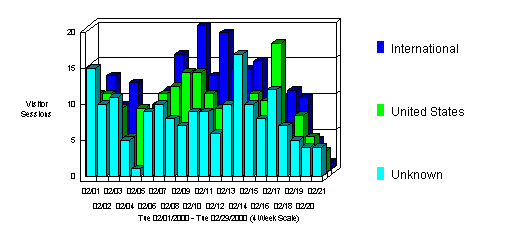
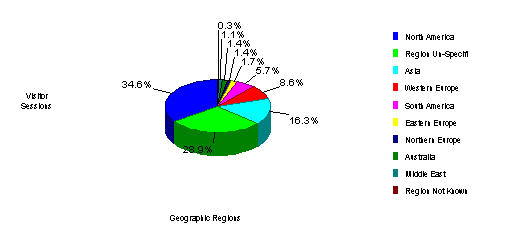
The Visitor Profile by Regions graph identifies the general location of the visitors to your Web site. The General Statistics table includes statistics on the total activity for this web site during the designated time frame.

Visitor Profile by Regions

Statistics Report Range: 02/01/2000 00:00:00 - 02/29/2000 23:59:59
Hits Entire Site (Successful) 6,115
Average Per Day 291
Home Page N/A
Page Views Page Views (Impressions) 1,932
Average Per Day 92
Document Views 1,674
Visitor Sessions Visitor Sessions 600
Average Per Day 28
Average Visitor Session Length 00:06:50
International Visitor Sessions 37.83%
Visitor Sessions of Unknown Origin 29.5%
Visitor Sessions from United States 32.66%
Visitors Unique Visitors 511
Visitors Who Visited Once 462
Visitors Who Visited More Than Once 49

General Statistics - Help Card Start of Chapter

 The table shows the date and time the report was generated, as well as the time frame for the report. All dates and times are referenced to the location of the system running the analysis
Timeframe - beginning date and time of your log.
The number of page hits -Are a count of actual successful hits for the document not including any graphics on the page. Pages can be files with extensions such as .htm, .html, .asp, and a few others (as defined by the Options | Web Traffic Analysis | File Types tab).
Impressions -A count of the number of pages viewed and not including the supporting graphic files within the page.
The total number of hits -Is a count of all the successful hits including HTML pages, pictures, forms, scripts and files downloaded.Tip: Visit http://www.webtrends.com/support/hits_views_sessions.htm for a more detailed description of pages and the visitor sessions.
Number of Hits for Home Page -Number of times the home page was visited. This statistic is derived from the home page setting in the profile.
Number of Successful Hits for Entire Site -Hits with a successful status code.
Number of Page Views (Impressions) -Page Views is the count of hits to documents and forms (as defined by the Options | Web Traffic Analysis | File Types tab).
Document Views - Document Views is the count of hits to documents (as defined by the Options | Web Traffic Analysis | File Types tab).
Number of Visitor Sessions - Hits to your site by a single visitor within a timeframe (as defined in Options | Web Traffic Analysis | General Tab).

Domestic, International and Unknown sections summarize the origin of visitors in percentages of hits.
Visitor Sessions From the United States - Sessions determined by the User Domain field in the log, and as defined by Options | Web Traffic Analysis | Domains.
International Visitor Sessions - Sessions determined by the User Domain field in the log, and as defined by Options | Web Traffic Analysis | Domains.
Visitor Sessions of Unknown Origins -Domains recorded in the log that have no configuration settings in Options | Web Traffic Analysis | Domains. Origins may also be unknown if the server does not log this field.

Averages indicate general statistics that span the log.
Average Number of Hits Per Day -Number of Successful Hits divided by the total number of days in the log.
Average Number of Page Views Per Day -Number of page views (impressions) divided by the total number of days in the log.
Average Number of Visitor Sessions Per Day -Number of visitor sessions divided by the total number of days in the log.
Average Visitor Session Length -Average of all visitor sessions in the log.

Unique visitors are a count of unique IPs for the period of the report, whether or not they were authenticated using domain names or cookies.
Number of Unique Visitors -Unique visitors are counted using visitor IP, domain name, or cookie (as defined in Options | Web Traffic Analysis | Cookies). Cookies are the most accurate.
Number of Visitors Who Visited Once -Visitor Sessions that occurred once throughout the log.
Number of Visitors Who Visited More Than Once -The count of Visitor Sessions that occurred with more than the default 30 minutes (or the time set for visitor sessions as defined in Options | Web Traffic Analysis | General Tab) between any activity.


 The General Stats table gives a general overview of the site's performance, helping you quickly assess the growth and the needs of the site. It can help you determine the report chapters that you should focus on for valuable site enhancement statistics.

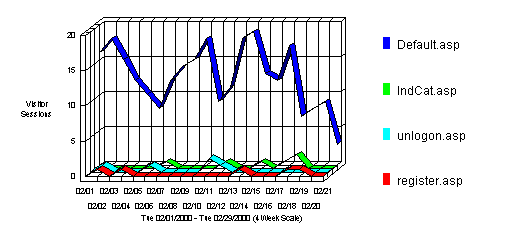
 Most Requested Pages

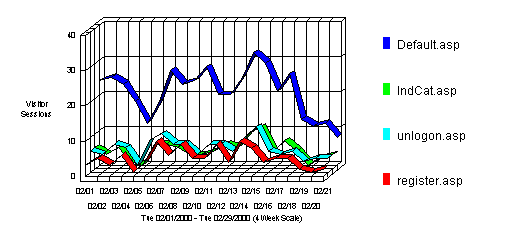
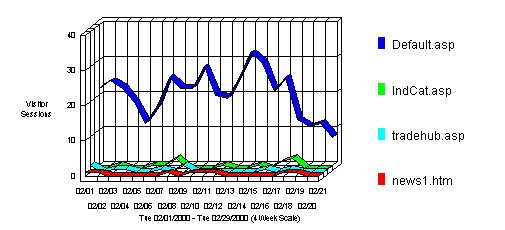
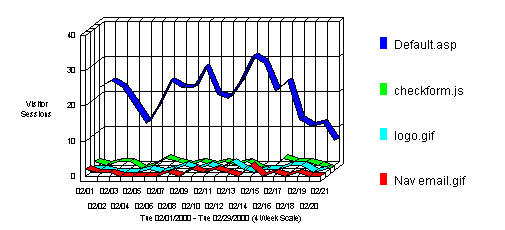
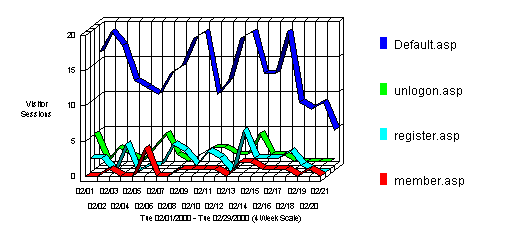
This section identifies the most popular web site pages and how often they were accessed. The average time a visitor spends viewing a page is also indicated in the table.

Most Requested Pages

Most Requested Pages
Pages
Views
% of Total Views
Visitor Sessions
Avg. Time Viewed
1
http://thai-industry.net/ Default.asp 556 33.21% 439
 00:01:58 
2
http://thai-industry.net/ IndCat.asp 202 12.06% 113
 00:00:16 
3
http://thai-industry.net/ unlogon.asp 200 11.94% 142
 00:00:37 
4
http://thai-industry.net/ register.asp 167 9.97% 107
 00:01:53 
5
http://thai-industry.net/ member.asp 126 7.52% 101
 00:00:36 
6
http://thai-industry.net/ RegDup.asp 88 5.25% 25
 00:00:35 
7
http://thai-industry.net/ tradehub.asp 77 4.59% 56
 00:00:53 
8
http://thai-industry.net/S& A.asp 58 3.46% 42
 00:00:12 
9
http://thai-industry.net/ ExForum.asp 40 2.38% 39
 00:00:20 
10
http://thai-industry.net/ news1.htm 29 1.73% 29
 00:02:34 
11
http://thai-industry.net/ default0.asp 29 1.73% 24
 00:01:30 
12
http://thai-industry.net/ news2.htm 27 1.61% 27
 00:03:19 
13
http://thai-industry.net/ proddispdata.asp 16 0.95% 7
 00:00:40 
14
http://thai-industry.net/ ulist.asp 12 0.71% 10
 00:07:26 
15
http://thai-industry.net/S& Adispdata.asp 8 0.47% 5
 00:01:16 
16
http://thai-industry.net/ default2.asp 6 0.35% 5
 00:00:17 
17
http://thai-industry.net/ TnkRegister.asp 3 0.17% 2
 00:00:01 
18
http://thai-industry.net/ default1.asp 3 0.17% 3
  
19
http://thai-industry.net/ iisadmin/iisrvls.asp 3 0.17% 2
 00:00:03 
20
http://thai-industry.net/ iisadmin/iistat.asp 3 0.17% 2
  
21
http://thai-industry.net/ iisadmin/default.asp 2 0.11% 1
 00:00:03 
22
http://thai-industry.net/ iisadmin/blank.htm 2 0.11% 1
 00:00:04 
23
http://thai-industry.net/ iisadmin/ 2 0.11% 1
  
24
http://thai-industry.net/ iisadmin/iigtdata.asp 2 0.11% 1
 00:08:06 
25
http://thai-industry.net/ iisadmin/iihd.asp 1 0.05% 1
 00:00:05 
26
http://thai-industry.net/ iisadmin/iibody.asp 1 0.05% 1
 00:00:05 
27
http://thai-industry.net/ admin/ 1 0.05% 1
 00:00:12 
28
http://thai-industry.net/ iisadmin/iimnu.asp 1 0.05% 1
 00:00:02 
29
http://thai-industry.net/ iisadmin/iis.asp 1 0.05% 1
 00:00:02 
30
http://thai-industry.net/ iisadmin/iiset.asp 1 0.05% 1
  
31
http://thai-industry.net/ iisadmin/iiwww.asp 1 0.05% 1
 00:00:02 
32
http://thai-industry.net/ iisadmin/iivd.asp 1 0.05% 1
  
33
http://thai-industry.net/ iisadmin/iinav.asp 1 0.05% 1
 00:00:01 
34
http://thai-industry.net/ iisadmin/iitool.asp 1 0.05% 1
 00:00:08 
35
http://thai-industry.net/ iisadmin/iivdhd.asp 1 0.05% 1
 00:00:09 
36
http://thai-industry.net/ iisadmin/iivddir.asp 1 0.05% 1
 00:03:23 
37
http://thai-industry.net/ iisadmin/iisnew.asp 1 0.05% 1
 00:00:04 
Subtotal For the Page Views Above 1,674 100% N/A
N/A
Total For the Log File 1,674 100% N/A
N/A

Most Requested Pages - Help Card Start of Chapter

 This section identifies the most popular pages on the site. The number of views includes only the successful hits for the page itself. It does not include any hits for graphics, audio or video files. The percentage of total views is the percentage of hits for that page compared to all other page types.
Tip: The types of files included in this table can be configured using the File Types tab in the Options dialog box.
Tip: You can list all pages on the site by selecting a number of elements higher than the number of pages on the site.


 Most likely these pages are requested the most because of their content and design. Based on the theory that the most requested pages have effectively attracted visitors, you can use similar elements and approaches to improve the less popular pages. Consider the average view times to determine which content holds visitor's attention.

 Least Requested Pages

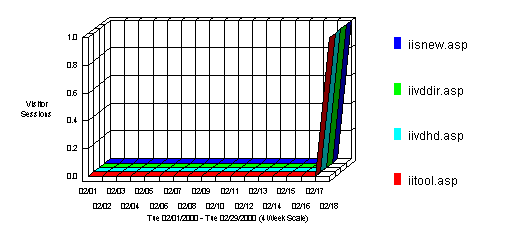
This section identifies the least popular pages on your Web site, and how often they were accessed.

Least Requested Pages

Least Requested Pages
 
Pages
Views
% of Total Views
Visitor Sessions
1
http://thai-industry.net/ iisadmin/iisnew.asp 1 0.05% 1
2
http://thai-industry.net/ iisadmin/iivddir.asp 1 0.05% 1
3
http://thai-industry.net/ iisadmin/iivdhd.asp 1 0.05% 1
4
http://thai-industry.net/ iisadmin/iitool.asp 1 0.05% 1
5
http://thai-industry.net/ iisadmin/iinav.asp 1 0.05% 1
6
http://thai-industry.net/ iisadmin/iivd.asp 1 0.05% 1
7
http://thai-industry.net/ iisadmin/iiwww.asp 1 0.05% 1
8
http://thai-industry.net/ iisadmin/iiset.asp 1 0.05% 1
9
http://thai-industry.net/ iisadmin/iis.asp 1 0.05% 1
10
http://thai-industry.net/ iisadmin/iimnu.asp 1 0.05% 1
11
http://thai-industry.net/ admin/ 1 0.05% 1
12
http://thai-industry.net/ iisadmin/iibody.asp 1 0.05% 1
13
http://thai-industry.net/ iisadmin/iihd.asp 1 0.05% 1
14
http://thai-industry.net/ iisadmin/iigtdata.asp 2 0.11% 1
15
http://thai-industry.net/ iisadmin/ 2 0.11% 1
16
http://thai-industry.net/ iisadmin/blank.htm 2 0.11% 1
17
http://thai-industry.net/ iisadmin/default.asp 2 0.11% 1
18
http://thai-industry.net/ iisadmin/iistat.asp 3 0.17% 2
19
http://thai-industry.net/ iisadmin/iisrvls.asp 3 0.17% 2
20
http://thai-industry.net/ default1.asp 3 0.17% 3

Least Requested Pages - Help Card Start of Chapter

 This section identifies the least popular pages on your Web site. The number of views only includes the successful hits for the page itself. It does not include any hits for graphics. The percentage of total views is the percentage of hits for that page compared to all other pages.
Tip: The types of files included in this table can be configured using the File Types tab in the Options dialog box.
Tip: You can list all pages on the site by setting the number of elements to a number higher than the number of pages on the site.


 There are many reasons that these pages are requested the least. Consider the content and the navigational tools or descriptions available to guide visitors to them. How do these pages differ from those that are most requested? Do the average view times indicate visitors are not attracted long enough to convey your message? This table may indicate areas on your site that may need attention.

 Top Entry Pages

This section identifies the first page viewed when a visitor visits this site. This is most likely your home page but, in some cases, it may also be specific URLs that visitors enter to access a particular page directly. The percentages refer to the total number of visitor sessions that started with a valid Document Type. If the session started on a document with a different type (such as a graphic or sound file), the file is not counted as an Entry Page, and the session is not counted in the total.

Top Entry Pages

Top Entry Pages
 
File
% of Total
Visitor Sessions
1
http://thai-industry.net/ Default.asp 85.4% 427
2
http://thai-industry.net/ IndCat.asp 2.6% 13
3
http://thai-industry.net/ tradehub.asp 1.8% 9
4
http://thai-industry.net/ news1.htm 1.6% 8
5
http://thai-industry.net/ unlogon.asp 1.6% 8
6
http://thai-industry.net/ register.asp 1.2% 6
7
http://thai-industry.net/ news2.htm 1% 5
8
http://thai-industry.net/ member.asp 1% 5
9
http://thai-industry.net/ ExForum.asp 0.8% 4
10
http://thai-industry.net/ default1.asp 0.6% 3
11
http://thai-industry.net/S& A.asp 0.6% 3
12
http://thai-industry.net/ prodlist.asp 0.6% 3
13
http://thai-industry.net/ ulist.asp 0.4% 2
14
http://thai-industry.net/ admin/ 0.2% 1
15
http://thai-industry.net/ default0.asp 0.2% 1
16
http://thai-industry.net/ iisadmin/ 0.2% 1
17
http://thai-industry.net/ iisadmin/iisrvls.asp 0.2% 1
Total For the Pages Above 100% 500

Top Entry Pages - Help Card Start of Chapter

 This section identifies the pages visitors first saw when they entered this site. This is most likely your home page but, in some cases, it may also be specific URLs that visitors enter to access a particular page directly. For example, if a visitor enters http://www.WebTrends.com/WT-QA.HTM, he/she entered at the WT-QA.HTM page.
Percentages refer to the total number of visitor sessions that started with a valid Document Type. If a session started on a document with a different type (such as a graphic or sound file), the file would not be counted as an Entry Page, and the session is not included in the total. Such sessions are often the product of other sites referencing a specific downloadable file or graphic for example on your site. In such cases, a session may have a single hit to a non-document type file, and will not be counted for the percentage calculations.
Also, web servers do not always log hits in perfect chronological order. For example, a hit to a GIF file can appear in the log before the hit to the HTML page that refers to this GIF.
Tip: Consider using the Entry Page filter to include or exclude entire visitor sessions based upon the first page a visitor viewed.

 This statistic can indicate how you might want to optimize the architecture of your site based on where visitors are entering. You can also determine which external links to your site are most effective. Consider updating meta-tags and links.

 Least Requested Entry Pages

This section identifies the first page viewed when a visitor visits this site. This is most likely your home page but, in some cases, it may also be specific URLs that visitors enter to access a particular page directly. The percentages refer to the total number of visitor sessions that started with a valid Document Type. If the session started on a document with a different type (such as a graphic or sound file), the file is not counted as an Entry Page, and the session is not counted in the total.

Least Requested Entry Pages

Least Requested Entry Pages
 
File
% of Total
Visitor Sessions
1
http://thai-industry.net/ iisadmin/iisrvls.asp 0.2% 1
2
http://thai-industry.net/ iisadmin/ 0.2% 1
3
http://thai-industry.net/ default0.asp 0.2% 1
4
http://thai-industry.net/ admin/ 0.2% 1
5
http://thai-industry.net/ ulist.asp 0.4% 2
6
http://thai-industry.net/ prodlist.asp 0.6% 3
7
http://thai-industry.net/S& A.asp 0.6% 3
8
http://thai-industry.net/ default1.asp 0.6% 3
9
http://thai-industry.net/ ExForum.asp 0.8% 4
10
http://thai-industry.net/ member.asp 1% 5
11
http://thai-industry.net/ news2.htm 1% 5
12
http://thai-industry.net/ register.asp 1.2% 6
13
http://thai-industry.net/ unlogon.asp 1.6% 8
14
http://thai-industry.net/ news1.htm 1.6% 8
15
http://thai-industry.net/ tradehub.asp 1.8% 9
16
http://thai-industry.net/ IndCat.asp 2.6% 13
17
http://thai-industry.net/ Default.asp 85.4% 427
Total For the Pages Above 100% 500

Least Requested Entry Pages - Help Card Start of Chapter

 This section identifies the pages visitors first saw when they entered this site. This is most likely your home page but, in some cases, it may also be specific URLs that visitors enter to access a particular page directly. For example, if a visitor enters http://www.WebTrends.com/WT-QA.HTM, he/she entered at the WT-QA.HTM page.
Percentages refer to the total number of visitor sessions that started with a valid Document Type. If a session started on a document with a different type (such as a graphic or sound file), the file would not be counted as an Entry Page, and the session is not included in the total. Such sessions are often the product of other sites referencing a specific downloadable file or graphic for example on your site. In such cases, a session may have a single hit to a non-document type file, and will not be counted for the percentage calculations.
Also, web servers do not always log hits in perfect chronological order. For example, a hit to a GIF file can appear in the log before the hit to the HTML page that refers to this GIF.
Tip: Consider using the Entry Page filter to include or exclude entire visitor sessions based upon the first page a visitor viewed.

 This statistic can indicate how you might want to optimize the architecture of your site based on where visitors are entering. You can also determine which external links to your site are least effective. Consider updating meta-tags and links.

 Top Entry Requests

This section identifies the first hit from a visitor visiting this site. This is most likely the home page but, in some cases, it may also be specific URLs that visitors enter to access a particular file directly. The percentages refer to the total number of visitor sessions.

Top Entry Requests

Top Entry Requests
 
File
% of Total
Visitor Sessions
1
http://thai-industry.net/ Default.asp 70.04% 421
2
http://thai-industry.net/java/ checkform.js 4.99% 30
3
http://thai-industry.net/ images/logo.gif 3.49% 21
4
http://thai-industry.net/ images/Nav_email.gif 2.66% 16
5
http://thai-industry.net/ images/Nav_home.gif 2.66% 16
6
http://thai-industry.net/ images/Nav_help.gif 1.99% 12
7
http://thai-industry.net/ images/TINtop1.gif 1.83% 11
8
http://thai-industry.net/ images/boilogo.gif 1.49% 9
9
http://thai-industry.net/ tradehub.asp 1.49% 9
10
http://thai-industry.net/ news1.htm 1.33% 8
11
http://thai-industry.net/ images/INFO04.gif 1.16% 7
12
http://thai-industry.net/ fphover.class 1.16% 7
13
http://thai-industry.net/ unlogon.asp 0.99% 6
14
http://thai-industry.net/ IndCat.asp 0.83% 5
15
http://thai-industry.net/ news2.htm 0.49% 3
16
http://thai-industry.net/ member.asp 0.49% 3
17
http://thai-industry.net/ ExForum.asp 0.49% 3
18
http://thai-industry.net/ register.asp 0.33% 2
19
http://thai-industry.net/ images/Registration.gif 0.33% 2
20
http://thai-industry.net/ fphoverx.class 0.33% 2
Total For the Requests Above 98.66% 593

Top Entry Requests - Help Card Start of Chapter

 This section identifies the first hit from visitors coming to this site. This is most likely the home page but, in some cases, it may also be specific URLs entered to access a particular file directly. For example, if a visitors enters http://www.WebTrends.com/WT-QA.HTM, he/she enters at the WT-QA.HTM page. The percentages refer to the total number of visitor sessions.
Tip: Consider using the Entry Page filter to include or exclude entire visitor sessions based upon the first page a visitor viewed.

 Consider what is catching the attention of visitors most quickly and effectively.

 Least Requested Entry Requests

This section identifies the first hit from a visitor visiting this site. This is most likely the home page but, in some cases, it may also be specific URLs that visitors enter to access a particular file directly. The percentages refer to the total number of visitor sessions.

Least Requested Entry Requests

Least Requested Entry Requests
 
File
% of Total
Visitor Sessions
1
http://thai-industry.net/ iisadmin/iisrvls.asp 0.16% 1
2
http://thai-industry.net/ iisadmin/ 0.16% 1
3
http://thai-industry.net/ default0.asp 0.16% 1
4
http://thai-industry.net/ admin/ 0.16% 1
5
http://thai-industry.net/S& A.asp 0.16% 1
6
http://thai-industry.net/ prodlist.asp 0.16% 1
7
http://thai-industry.net/ default1.asp 0.16% 1
8
http://thai-industry.net/ ulist.asp 0.16% 1
9
http://thai-industry.net/ fphoverx.class 0.33% 2
10
http://thai-industry.net/ images/Registration.gif 0.33% 2
11
http://thai-industry.net/ register.asp 0.33% 2
12
http://thai-industry.net/ ExForum.asp 0.49% 3
13
http://thai-industry.net/ member.asp 0.49% 3
14
http://thai-industry.net/ news2.htm 0.49% 3
15
http://thai-industry.net/ IndCat.asp 0.83% 5
16
http://thai-industry.net/ unlogon.asp 0.99% 6
17
http://thai-industry.net/ fphover.class 1.16% 7
18
http://thai-industry.net/ images/INFO04.gif 1.16% 7
19
http://thai-industry.net/ news1.htm 1.33% 8
20
http://thai-industry.net/ tradehub.asp 1.49% 9
Total For the Requests Above 10.81% 65

Least Requested Entry Requests - Help Card Start of Chapter

 This section identifies the first hit from visitors coming to this site. This is most likely the home page but, in some cases, it may also be specific URLs entered to access a particular file directly. For example, if a visitors enters http://www.WebTrends.com/WT-QA.HTM, he/she enters at the WT-QA.HTM page. The percentages refer to the total number of visitor sessions.
Tip: Consider using the Entry Page filter to include or exclude entire visitor sessions based upon the first page a visitor viewed.

 Consider what isn't catching the attention of visitors very quickly or effectively.

 Top Exit Pages

This section identifies the pages visitors were on when they left the site. The percentages refer to the total number of visitor sessions that started with a valid Document Type. If the session started on a document with a different type (such as a graphic or sound file), the file is not counted as an Exit Page, and the session is not counted in the total.

Top Exit Pages

Top Exit Pages
 
Pages
% of Total
Visitor Sessions
1
http://thai-industry.net/ Default.asp 57.02% 284
2
http://thai-industry.net/ unlogon.asp 9.63% 48
3
http://thai-industry.net/ register.asp 7.83% 39
4
http://thai-industry.net/ member.asp 3.41% 17
5
http://thai-industry.net/ IndCat.asp 2.61% 13
6
http://thai-industry.net/ prodlist.asp 2.4% 12
7
http://thai-industry.net/ tradehub.asp 2% 10
8
http://thai-industry.net/ news2.htm 2% 10
9
http://thai-industry.net/ ulist.asp 1.8% 9
10
http://thai-industry.net/S& A.asp 1.8% 9
11
http://thai-industry.net/ RegDup.asp 1.8% 9
12
http://thai-industry.net/ news1.htm 1.6% 8
13
http://thai-industry.net/ TnkRegister.asp 1.4% 7
14
http://thai-industry.net/ ExForum.asp 1.4% 7
15
http://thai-industry.net/ default0.asp 1% 5
16
http://thai-industry.net/ default1.asp 0.6% 3
17
http://thai-industry.net/ proddispdata.asp 0.6% 3
18
http://thai-industry.net/ default2.asp 0.4% 2
19
http://thai-industry.net/S& Adispdata.asp 0.2% 1
20
http://thai-industry.net/ iisadmin/iistat.asp 0.2% 1
Total For the Pages Above (only sessions starting on a valid document type are included) 99.79% 497

Top Exit Pages - Help Card Start of Chapter

 This section identifies the pages visitors were on when they left the site. These percentages refer to the total number of visitor sessions that started with a valid Document Type. If the session started on a document with a different type (such as a graphic or sound file), the file is not counted as an Exit Page, and the session is not counted in the total. Such sessions are often the product of other sites referencing a specific downloadable file or graphic for example on the site. In such cases, a session may have a single hit to a non-document type file, and will not be counted for the percentage calculations.

 Use this statistic to determine your visitors' satisfaction with their visits. Visitors may have left this page once they found what they were looking for, or they have lost interest or determined the content didn't apply, or for many other reasons. For example, if your top exit page is your home page, this may be an indication that you need a better approach.

 Single Access Pages

This section identifies the pages on the site that visitors access and exit without viewing any other page. The percentages refer to the total number of visitor sessions that started with a valid Document Type. If the session started on a document with a different type (such as a graphic or sound file), the file is not counted as a Single Access Page, and the session is not counted in the total

Single Access Pages

Single Access Pages
 
Pages
% of Total
Visitor Sessions
1
http://thai-industry.net/ Default.asp 90.1% 264
2
http://thai-industry.net/ IndCat.asp 2.04% 6
3
http://thai-industry.net/ unlogon.asp 1.7% 5
4
http://thai-industry.net/ register.asp 1.7% 5
5
http://thai-industry.net/ news1.htm 1.02% 3
6
http://thai-industry.net/ member.asp 1.02% 3
7
http://thai-industry.net/ news2.htm 1.02% 3
8
http://thai-industry.net/ prodlist.asp 0.68% 2
9
http://thai-industry.net/ tradehub.asp 0.34% 1
10
http://thai-industry.net/ ulist.asp 0.34% 1
Total For the Pages Above 100% 293

Single Access Pages - Help Card Start of Chapter

 This section identifies the pages on the site that visitors access and exit without viewing any other page. This demonstrates where visitors enter and leave immediately. These percentages refer to the total number of visitor sessions that started with a valid Document Type. If the session started on a document with a different type (such as a graphic or sound file), the file is not counted as a Single Access Page, and the session is not included in the total.

 This information can be helpful when considering the design of the site with respect to the type of visitors. Consider how well these pages convey your message. Do they need improvement to extend visitor sessions, or is it possible that are you attracting the wrong visitors with references to your site?

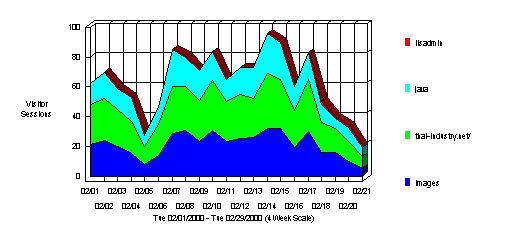
 Most Accessed Directories

This section analyzes accesses to the directories of the site. This information can be useful in determining the types of data most often requested.

Most Accessed Directories

Most Accessed Directories
 
Path to Directory
Hits
% of Total Hits
Non Cached %
Non Cached K Xferred
Visitor Sessions
1
http://thai-industry.net/ images 3,096 50.62% 75.54% 5,557 450
2
http://thai-industry.net/ 2,512 41.07% 96.85% 14,796 526
3
http://thai-industry.net/java 450 7.35% 67.55% 2,089 340
4
http://thai-industry.net/ iisadmin 56 0.91% 100% 136 2
5
http://thai-industry.net/ admin 1 0.01% 100% 1 1

Most Accessed Directories - Help Card Start of Chapter

 This section analyzes accesses to your site's directories. The table lists the most accessed directories in decreasing order of the number of hits. Non-Cached % represents the percentage of hits that were not already in the visitor's browser cache. Use this information to determine the types of data most often requested.
Tip: To focus your report, consider using the Directory filter to include or exclude directories and sub-directories.

 These trends indicate the content visitors are most interested in. Use this information to determine content areas to develop, which to focus on less, and how to arrange your content for optimal effect.

 Top Paths Through Site

This section identifies the paths visitors most often follow when visiting the site. The path begins at the starting page and shows the following consecutive pages viewed.

Top Paths Through Site by Starting Page
Starting Page
Paths from Start
% of Total
Visitor Sessions
All Entry Pages
  1. http://thai-industry.net/ Default.asp
53.01% 264
  1. http://thai-industry.net/ Default.asp
  2. http://thai-industry.net/ IndCat.asp
  3. http://thai-industry.net/ unlogon.asp
  4. http://thai-industry.net/ member.asp
  5. http://thai-industry.net/ register.asp
4.81% 24
  1. http://thai-industry.net/ Default.asp
  2. http://thai-industry.net/ IndCat.asp
  3. http://thai-industry.net/ unlogon.asp
3.01% 15
  1. http://thai-industry.net/ IndCat.asp
1.2% 6
  1. http://thai-industry.net/ unlogon.asp
1% 5
  1. http://thai-industry.net/ register.asp
1% 5
  1. http://thai-industry.net/ Default.asp
  2. http://thai-industry.net/ register.asp
1% 5
  1. http://thai-industry.net/ Default.asp
  2. http://thai-industry.net/ default1.asp
  3. http://thai-industry.net/ ulist.asp
0.8% 4
  1. http://thai-industry.net/ Default.asp
  2. http://thai-industry.net/ tradehub.asp
  3. http://thai-industry.net/ unlogon.asp
  4. http://thai-industry.net/ member.asp
  5. http://thai-industry.net/ register.asp
0.8% 4
  1. http://thai-industry.net/ Default.asp
  2. http://thai-industry.net/ unlogon.asp
  3. http://thai-industry.net/ IndCat.asp
  4. http://thai-industry.net/ member.asp
  5. http://thai-industry.net/ register.asp
0.8% 4
  1. http://thai-industry.net/ Default.asp
  2. http://thai-industry.net/ member.asp
0.6% 3
  1. http://thai-industry.net/ Default.asp
  2. http://thai-industry.net/ register.asp
  3. http://thai-industry.net/ TnkRegister.asp
  4. http://thai-industry.net/ Default.asp
  5. http://thai-industry.net/ default1.asp
0.6% 3
  1. http://thai-industry.net/ tradehub.asp
  2. http://thai-industry.net/ unlogon.asp
0.6% 3
  1. http://thai-industry.net/ member.asp
0.6% 3
  1. http://thai-industry.net/ news1.htm
0.6% 3
  1. http://thai-industry.net/ news2.htm
0.6% 3
  1. http://thai-industry.net/ Default.asp
  2. http://thai-industry.net/ news1.htm
0.6% 3
  1. http://thai-industry.net/ Default.asp
  2. http://thai-industry.net/ IndCat.asp
  3. http://thai-industry.net/ unlogon.asp
  4. http://thai-industry.net/S& A.asp
0.4% 2
  1. http://thai-industry.net/ Default.asp
  2. http://thai-industry.net/ IndCat.asp
  3. http://thai-industry.net/ unlogon.asp
  4. http://thai-industry.net/ Default.asp
0.4% 2
  1. http://thai-industry.net/ Default.asp
  2. http://thai-industry.net/ IndCat.asp
  3. http://thai-industry.net/ unlogon.asp
  4. http://thai-industry.net/ member.asp
  5. http://thai-industry.net/ Default.asp
0.4% 2

Top Paths Through Site - Help Card Start of Chapter

 This section shows you the most frequently traveled paths your visitors take when accessing the specified web pages.

 Use this information to evaluate the design of your web site. Where do people go from theses pages? What pages are visited first? Do your visitors appear to be looking for pages that should be more accessible?

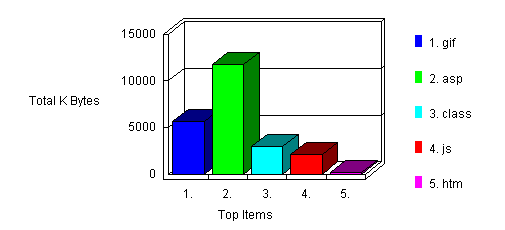
 Most Downloaded File Types

This section identifies the accessed file types and the total kilobytes downloaded for each file type. Cached requests and erred hits are excluded from the totals.

Most Downloaded File Types

Most Downloaded File Types
 
File type
Files
K Bytes Transferred
1
gif 2,368 5,606
2
asp 1,871 11,734
3
class 529 2,971
4
js 305 2,091
5
htm 60 177
Total Files & K Bytes Transferred 5,133 22,577

Most Downloaded File Types - Help Card Start of Chapter

 This section identifies the accessed file types and the total kilobytes downloaded for each file type. Cached requests and erred hits are excluded from the totals. The types of files downloaded are listed in decreasing order of the number of file downloads, and the number of kilobytes transferred is given for each file type.
Tip: You can use the File Types tab in the Options dialog box to specify the types of files included in this table. Tip: To focus your report, consider using the File filter to include or exclude files or file types.

 This provides a general statistic for the type of data visitors are interested in downloading from your site. Use this to consider which download types require improvements for better conveying your message.

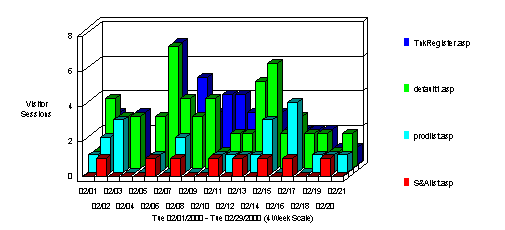
 Dynamic Pages & Forms

This section identifies the most popular dynamic pages and forms executed by the server. WebTrends counts any line with a Post command or a Get command with a "?" as a dynamic page, and shows only successful hits.

Dynamic Pages & Forms

Dynamic Pages & Forms
 
Dynamic Pages
No. of Pages
% of Total
Visitor Sessions
1
http://thai-industry.net/ TnkRegister.asp 119 46.12% 55
2
http://thai-industry.net/ default1.asp 74 28.68% 60
3
http://thai-industry.net/ prodlist.asp 54 20.93% 23
4
http://thai-industry.net/S& Alist.asp 11 4.26% 8

Dynamic Pages & Forms - Help Card Start of Chapter

 This section shows the dynamic pages and forms that are used the most.

 If you have a dynamic site, this table can be used with the Most Requested Pages table to determine your most popular pages. In addition, you can also use this information to place ads of higher value on the most popular pages.

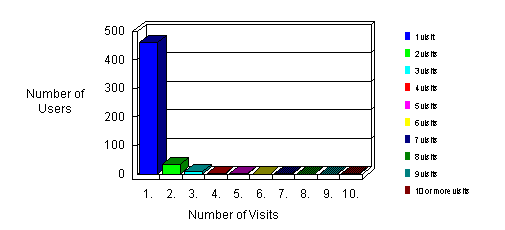
 Visitors by Number of Visits During Report Period

This section shows the distribution of visitors based on how many times each visitor visited your site.

Visitors by Number of Visits During Report Period

Visitors by Number of Visits During Report Period
Number of Visits
Number of Visitors
% of Total Unique Visitors
 1 visit 462 90.41%
 2 visits 33 6.45%
 3 visits 8 1.56%
 4 visits 3 0.58%
 5 visits 1 0.19%
 6 visits 0 0%
 7 visits 3 0.58%
 8 visits 0 0%
 9 visits 0 0%
10 or more visits  1  0.19%

Visitors by Number of Visits During Report Period - Help Card Start of Chapter

 This section shows the distribution of visitors based on how many times each visitor visited your site. This covers visits made during the reporting period only; a visitor's visits before or after the reporting period do not contribute to the visitor's visit count.

 This statistic is an indication of whether or not your site compels return visits. Updating web site content is one way to improve this statistic.

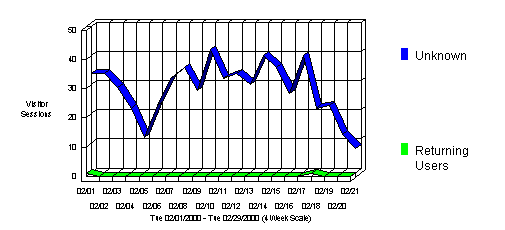
 New vs. Returning Visitors

This section shows the number of first-time visitors to your site and the number of returning visitors to your site. Only visitors identified by cookies are counted. First-time visitors are those who didn't have a cookie on their 1st hit, but had one on later hits. Returning visitors are those who already had a cookie on their 1st hit (their previous visit happened before the start of this report period.)

New vs. Returning Visitors

New vs. Returning Visitors
New or Returning Visitor
Number of Visitor Sessions
% of Total Sessions
Unknown 597 99.50%
Returning Users 2 0.33%

New vs. Returning Visitors - Help Card Start of Chapter

 This section shows the number of first-time visitors to your site and the number of returning visitors to your site. Only visitors who can be identified with cookies are counted. First-time visitors are those who didn't have a cookie on their 1st hits, but had one on later hits. Returning visitors are those who already had a cookie on their 1st hit, and whose previous visit happened before the start of this report period. To get the most accurate information, make sure you set up the Cookies tab in the Options window to properly interpret the cookies you give to visitors.

 By considering the ratio between new and returning visitors over a period of time, you can determine if your site is adequately attracting repeat visits. If you consistently have a high number of returning visitors, congratulations; you're doing a good job! However, if you are accustomed to seeing a low number of returning visitors, it's time to figure out why.

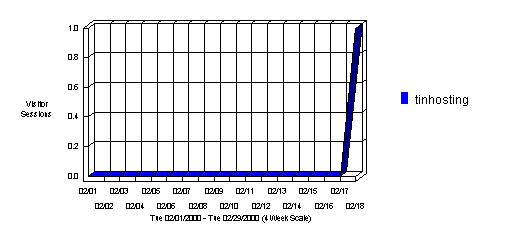
 Top Authenticated Visitors

This section identifies the true name and relative activity level of the visitors logging onto a server that requires user name and password. You may find more authenticated visitors than visitors (in the following table) as several persons may be using the same IP address. Since many ISPs dynamically assign IP addresses, and since multiple visitors may come from a single IP address, authentication is a much more accurate way to identify top visitors.

Top Authenticated Visitors

Top Authenticated Visitors
 
Visitor
Hits
% of Total Hits
Visitor Sessions
1
tinhosting 56 100% 1
Total 56 100% 1

Top Authenticated Visitors - Help Card Start of Chapter

 This section shows the authenticated users who visited your site the most.

 You may use this information for your marketing efforts, such as special promotions or newsletters.

 Top Visitors

This section identifies the IP address and/or domain name and their relative activity level on the site. If you do not use WebTrends cookies to track sessions on the site, WebTrends cannot differentiate between hits from different visitors of a same IP.

Top Visitors
 
Visitor
Hits
% of Total Hits
Visitor Sessions
1
fw-mandmz-179.nscgld.com 124 2.02% 10
2
as4-dial6.pntc.mi.voyager.net 105 1.71% 7
3
wc-sp2.loxinfo.co.th 86 1.4% 7
4
ckvl-cs03-t39.citlink.net 81 1.32% 2
5
194.125.170.104 78 1.27% 1
6
24.232.22.23 73 1.19% 1
7
dial10058.odn.de 69 1.12% 1
8
cm-24-29-70-30.nycap.rr.com 55 0.89% 3
9
193.251.132.38 52 0.85% 1
10
203.144.235.188 50 0.81% 1
11
202.57.132.145 49 0.8% 1
12
98AE718D.ipt.aol.com 48 0.78% 1
13
PPP-188-246.bng.vsnl.net.in 46 0.75% 1
14
BE-68-MADR-X4.red.retevision.es 46 0.75% 2
15
dorm207.dom.edu 45 0.73% 1
16
228.los-angeles-18-19rs.ca.dial-access.att.net 45 0.73% 1
17
Cagua-ppp019.t-net.net.ve 44 0.71% 2
18
scream.auckland.ac.nz 43 0.7% 1
19
202.163.226.47 43 0.7% 1
20
TruPPP2746.inet.co.th 43 0.7% 1
Subtotal for Visitors Above 1,225 20.03% 46
Total 6,115 100% 600

Top Visitors - Help Card Start of Chapter

 This section identifies IP addresses and/or domain names of visitors and their relative activity level. If you use WebTrends cookies to track sessions on the site, WebTrends can differentiate hits from visitors with the same IP address.
Tip: Consider the Visitor Address Filter to include or exclude activity based on visitor IP or domain.

 Consider the visitors who use the site most, and tailor your site to their interests and needs. If this is an intranet, notice which employees use the site the most and find out what they like about it. You might also get feedback from those who use it the least and find out what they are looking for.

 Top Geographic Regions

This section identifies the top locations of the visitors to the site by geographic region. The geographic region of the visitor is determined by the suffix of their domain name. Use this information carefully because this information is based on where the domain name of the visitor is registered, and may not always be an accurate identifier of the actual geographic location of this visitor. For example, while a vast majority of .com domain names are from North America, there is a small minority of domain names that exist outside of North America.

Top Geographic Regions

Top Geographic Regions
 
Geographic Regions
Visitor Sessions
1
North America 121
2
Region Un-Specified 101
3
Asia 57
4
Western Europe 30
5
South America 20
6
Eastern Europe 6
7
Northern Europe 5
8
Australia 5
9
Middle East 4
10
Region Not Known 1
Total 350

Top Geographic Regions - Help Card Start of Chapter

 This section identifies the top locations of the visitors to the site by geographic region. The geographic region is determined by the suffix of their domain names. Use this information carefully because it is based on where the domain name of the visitor is registered, and may not always be an accurate identifier of the visitor's actual geographic location. For example, while a vast majority of .com domain names are from North America, there is a small minority that exist outside of North America.
If reverse DNS lookups have not been performed, WebTrends cannot determine the country of origin and this section is not included in the report. The table lists the top geographic regions in decreasing order of the number of hits.
Tip: Consider the Visitor Address Filter to include or exclude activity based on visitor country.

 This information can help you meet the needs of your target audience as well as discover new audiences. Consider how you can make the content comprehensive and relevant to an International audience.

 Most Active Countries

This section identifies the top locations of the visitors to the site by country. The country of the visitor is determined by the suffix of their domain name. Use this information carefully because this information is based on where the domain name of the visitor is registered, and may not always be an accurate identifier of the actual geographic location of this visitor. For example, while a vast majority of .com domain names are from the United States, there is a small minority of domain names that exist outside of the United States.

Most Active Countries

Most Active Countries
 
Countries
Visitor Sessions
1
United States 196
2
Thailand 62
3
Argentina 31
4
Russian Federation 12
5
Mexico 12
6
Spain 10
7
Canada 9
8
Japan 9
9
Switzerland 9
10
UK 8
11
AU 6
12
Malaysia 5
13
Germany 4
14
Uruguay 4
15
Italy 4
16
Sweden 3
17
Denmark 3
18
India 3
19
Singapore 3
20
Venezuela 2
Total 395

Most Active Countries - Help Card Start of Chapter

 This section identifies the top locations of the visitors to the site by country. The country is determined by the suffix of their domain names. Use this information carefully because it is based on where the domain name of the visitor is registered, and may not always be an accurate identifier of the visitor's actual geographic location. For example, while a vast majority of .com domain names are from the United States, there is a small minority that exist outside of the United States.
If reverse DNS lookups have not been performed, WebTrends cannot determine the country of origin and this section is not included in the report. The table lists the top countries in decreasing order of the number of hits.
Tip: Consider the Visitor Address Filter to include or exclude activity based on visitor country.

 This information can help you meet the needs of your target audience as well as discover new audiences. Consider how you can make the content comprehensive and relevant to an International audience.

 North American States and Provinces

This section breaks down web site activity to show which of the North American States and Provinces were the most active on the site. This information is based on where the domain name of the visitor is registered, and may not always be an accurate representation of the actual geographic location of this visitor. This information can only be displayed if reverse DNS lookups have been performed.

North American States & Provinces

North American States & Provinces
 
State
Visitor Sessions
1
Virginia 39
2
Michigan 18
3
California 16
4
New Jersey 8
5
Oregon 7
6
Minnesota 5
7
Connecticut 5
8
Georgia 5
9
New York 4
10
Massachusetts 4
11
Texas 3
12
Florida 3
13
Wisconsin 2
14
Pennsylvania 2
15
Ontario 1
16
Missouri 1
17
Maryland 1
18
Hawaii 1
19
Illinois 1
20
New Mexico 1
Total For the States Above 127

North American States and Provinces - Help Card Start of Chapter

 This section shows which of the North American States and Provinces were the most active on the site. This information is based on where the domain name of the visitor is registered, and may not always be an accurate representation of the actual geographic location of this visitor (for example, individual visitors will often be seen as coming from the state where their ISPs are registered.) This information can only be displayed if reverse DNS lookups have been performed.

 This information can help you cater to your audience. Expand your audience by addressing the needs of those you want to draw to the site.

 Most Active Cities

This section further breaks down the site's activity to show which cities were the most active on the site. This information is based on where the domain name of the visitor is registered, and may not always be an accurate representation of the actual geographic location of this visitor. This information can only be displayed if reverse DNS lookups have been performed.

Most Active Cities

Most Active Cities
 
City, State
Visitor Sessions
1
Vienna, Virginia, United States 18
2
Falls Church, Virginia, United States 12
3
Ecourse, Michigan, United States 10
4
Lansing, Michigan, United States 7
5
Palo Alto, California, United States 7
6
Lincroft, New Jersey, United States 6
7
Medofrd, Oregon, United States 6
8
Atlanta, Georgia, United States 5
9
Golden Valley, Minnesota, United States 4
10
San Jose, California, United States 3
11
Cambridge, Massachusetts, United States 3
12
Reston, Virginia, United States 3
13
Rochester, New York, United States 2
14
Fort Worth, Texas, United States 2
15
Herndon, Virginia, United States 2
16
Danbury, Connecticut, United States 2
17
Stamford, Connecticut, United States 2
18
Floyd, Virginia, United States 2
19
Monett, Missouri, United States 1
20
Las Cruces, New Mexico, United States 1
Total For the Cities Above 98

Most Active Cities - Help Card Start of Chapter

 This section breaks down activity further to show which cities were the most active. This information is based on where the visitor's domain name is registered, and may not necessarily be an accurate representation of the visitor's actual geographic location. For example, visitors are frequently shown as coming from the city where their ISPs are registered.) This information can only be provided if reverse DNS lookups have been performed.

 City information can be useful in focusing your marketing efforts in other media such as print or television advertising.

 Most Active Organizations

This section identifies the companies or organizations that accessed the site the most often.

Most Active Organizations

Most Active Organizations
 
Organizations
Hits
% of Total Hits
Visitor Sessions
1
inet.co.th 175 2.87% 12
2
America Online
aol.com
171 2.81% 18
3
cscoms.com 134 2.2% 8
4
loxinfo.net.th 125 2.05% 10
5
National Steel Corp. / Great Lakes Division
nscgld.com
124 2.04% 10
6
asiaaccess.net.th 107 1.76% 7
7
Voyager Information Networks
voyager.net
105 1.72% 7
8
vsnl.net.in 105 1.72% 3
9
At&T Easylink Services
att.net
96 1.57% 6
10
loxinfo.co.th 89 1.46% 8
11
tm.net.my 89 1.46% 4
12
Citizens Utilities Company
citlink.net
81 1.33% 2
13
red.retevision.es 79 1.29% 4
14
194.125.170.104 78 1.28% 1
15
Uunet Technologies Inc.
uu.net
77 1.26% 12
16
24.232.22.23 73 1.2% 1
17
Mikota Maentz
rr.com
71 1.16% 6
18
dial10058.odn.de 69 1.13% 1
19
Leni Wilcox Consultant
home.com
58 0.95% 4
20
Level3.net 52 0.85% 6
Subtotal For Companies Above 1,958 32.21% 130
Total For the Log File 6,115 100% 600

Most Active Organizations - Help Card Start of Chapter

 This section identifies the companies or organizations that accessed the site the most often. If the DNS lookup option is set to "Always" or "Automatically," WebTrends searches for the domain name in the company database, and includes the company name and geographic information in the graph and table. If reverse DNS lookups are not performed, either by WebTrends or by the server, only IP addresses are listed. The table lists companies and organizations in decreasing order of the number of hits.

 Determine how your e-business can be improved according to how businesses are using your site. Consider how your product can be made more attractive to organizations that have shown interest.

 Organization Breakdown

This section provides a breakdown by types of organizations (.com, .net, .edu, .org, .mil, and .gov.) This information can only be displayed if reverse DNS lookups have been performed, and the percentages refer to the total of hits for which the organization type can be determined (some IPs cannot be resolved to a domain, and therefore an organization type cannot be determined).

Organization Breakdown

Organization Breakdown
 
Organization Type
Hits
% of Total Hits
Visitor Sessions
1
Company 1,474 47.47% 142
2
Network 1,262 40.64% 136
3
Education 305 9.82% 22
4
Organization 39 1.25% 8
5
Arpanet 17 0.54% 1
6
Government 8 0.25% 1
Total for Known Organization Types 3,105 100% 310

Organization Breakdown - Help Card Start of Chapter

 This section provides a breakdown by types of organizations (.com, .net, .edu, .org, .mil, and .gov.) The table lists the types of organizations in decreasing order of the number of hits. This information can only be provided if reverse DNS lookups have been performed, and the percentages refer to the total of hits for which the organization type can be determined (some IPs cannot be resolved to a domain, and therefore an organization type cannot be determined).

 Consider what type of organization is interested in your site and how you can attract other types.

 Summary of Activity for Report Period

This section outlines general server activity, comparing the level of activity on weekdays and weekends. The Average Number of Visitors and Hits on Weekdays are the averages for each individual week day. The Average Number of Visitors and Hits for Weekends groups Saturday and Sunday together. Values in the table do not include erred hits.

Summary of Activity for Report Period
Average Number of Visitors per day on Weekdays 31
Average Number of Hits per day on Weekdays 321
Average Number of Visitors for the entire Weekend 45
Average Number of Hits for the entire Weekend 432
Most Active Day of the Week Mon
Least Active Day of the Week Sat
Most Active Day Ever February 14, 2000
Number of Hits on Most Active Day 493
Least Active Day Ever February 21, 2000
Number of Hits on Least Active Day 99
Most Active Hour of the Day 21:00-21:59
Least Active Hour of the Day 16:00-16:59

Summary of Activity for Report Period - Help Card Start of Chapter

 This section outlines general server activity, comparing the level of activity on weekdays and weekends. The Average Number of Visitors and Hits on Weekdays are the averages for each individual weekday. The Average Number of Visitors and Hits for Weekends groups Saturday and Sunday together. Values in the table do not include erred hits.

 This table is useful for determining the best day of the week to perform system maintenance. You can determine least popular and most popular use trends for development of the site.

 Summary of Activity by Time Increment

This section helps you understand the bandwidth requirements of the site by indicating the volume of activity in kilobytes transferred. The table provides various measures of activity by unit of time for the report period (the unit of time depends on the amount of time covered by the report, and will be the day in most cases).

Activity by Time Increment (Bandwidth)

Summary of Activity by Time Increment
Time Interval
Hits
Page Views
KBytes Transferred
Visitor Sessions
02/01
207 59 830 K 35
02/02
311 97 1,208 K 34
02/03
252 76 893 K 29
02/04
257 88 1,003 K 22
02/05
105 25 478 K 12
02/06
213 82 752 K 23
02/07
479 129 1,629 K 32
02/08
358 99 1,208 K 36
02/09
421 139 1,548 K 28
02/10
340 110 1,365 K 43
02/11
284 121 1,204 K 32
02/12
346 106 1,157 K 34
02/13
336 88 1,203 K 30
02/14
493 159 1,976 K 40
02/15
470 155 1,564 K 36
02/16
270 86 1,117 K 27
02/17
302 107 973 K 40
02/18
274 88 946 K 23
02/19
140 40 553 K 23
02/20
158 37 558 K 13
02/21
99 41 422 K 8
Total 6,115 1,932 22,587 K 600

Summary of Activity by Time Increment - Help Card Start of Chapter

 This section helps you understand the bandwidth requirements of the site by indicating the volume of activity in kilobytes transferred. The table provides various measures of activity by unit of time for the report period (the unit of time depends on the amount of time covered by the report, and will be the day in most cases).

 Periods of less activity should be considered for maintenance and content improvement.

 Activity Level by Day of the Week

This section shows the activity for each day of the week for the report period (i.e. if there are two Mondays in the report period, the value presented is the sum of all hits for both Mondays.) Values in the table do not include erred hits.

Activity Level By Day of the Week

Activity Level by Day of the Week
 
Day
Hits
% of Total Hits
Visitor Sessions
1
Sun 707 11.56% 66
2
Mon 1,071 17.51% 80
3
Tue 1,035 16.92% 107
4
Wed 1,002 16.38% 89
5
Thu 894 14.61% 112
6
Fri 815 13.32% 78
7
Sat 591 9.66% 69
Total Weekdays 4,817 78.77% 466
Total Weekend 1,298 21.22% 135

Activity Level by Day of the Week - Help Card Start of Chapter

 This section shows the activity for each day of the week for the report period (i.e. if there are two Mondays in the report period, the value presented is the sum of all hits for both Mondays.) The table lists the number of hits, percentage of total hits and visitor sessions for each day of the week for the report period. Values in this table do not include erred hits.
Tip: Consider the Day of Week Filter to include or exclude activity based on the day of the week.

 Days of less activity should be considered for maintenance and content improvement.

 Activity Level by Hour of the Day

This section shows the most and the least active hour of the day for the report period. The second table breaks down activity for the given report period to show the average activity for each individual hour of the day (if there are several days in the report period, the value presented is the sum of all hits during that period of time for all days). All times are referenced to the location of the system running the analysis.

Activity Level By Hour of the Day

Activity Level by Hours Details
Hour
# of Hits
% of Total Hits
# of Visitor Sessions
00:00 - 00:59
278 4.54% 28
01:00 - 01:59
376 6.14% 28
02:00 - 02:59
339 5.54% 27
03:00 - 03:59
309 5.05% 28
04:00 - 04:59
332 5.42% 25
05:00 - 05:59
258 4.21% 23
06:00 - 06:59
344 5.62% 25
07:00 - 07:59
339 5.54% 27
08:00 - 08:59
203 3.31% 26
09:00 - 09:59
404 6.6% 26
10:00 - 10:59
234 3.82% 38
11:00 - 11:59
252 4.12% 40
12:00 - 12:59
147 2.4% 13
13:00 - 13:59
219 3.58% 26
14:00 - 14:59
174 2.84% 20
15:00 - 15:59
70 1.14% 12
16:00 - 16:59
26 0.42% 3
17:00 - 17:59
80 1.3% 12
18:00 - 18:59
132 2.15% 23
19:00 - 19:59
331 5.41% 33
20:00 - 20:59
383 6.26% 25
21:00 - 21:59
407 6.65% 48
22:00 - 22:59
236 3.85% 23
23:00 - 23:59
242 3.95% 21
Total Visitors during Work Hours (8:00am-5:00pm) 1,729 28.27% 204
Total Visitors during After Hours (5:01pm-7:59am) 4,386 71.72% 396

Activity Level by Hour of the Day - Help Card Start of Chapter

 This section shows the most and the least active hour of the day for the report period. The second table breaks down activity for the given report period to show the average activity for each individual hour of the day (if there are several days in the report period, the value presented is the sum of all hits during that period of time for all days). All times are referenced to the location of the system running the analysis. The table lists the percentage of total hits and visitor sessions, as well as the totals for work hours (8:00am - 5:00pm) and after hours (5:01pm - 7:59am).
Tip: Consider the Hour of Day Filter to include or exclude activity based on the time of day.

 This information is useful in determining what hour of the day is best for system maintenance.

 Activity Level by Length of Visit

This section shows the number and percentages of visits and page views over selected visit lengths.

Activity Level By Visit Length

Activity Level by Length of Visit
Visit Duration (Minutes)
Visits
Page Views
% of Total Visits
% of Total Views
0-1 428 437 71.33% 22.67%
1-2 33 143 5.5% 7.42%
2-3 23 117 3.83% 6.07%
3-4 14 122 2.33% 6.33%
4-5 11 94 1.83% 4.87%
5-6 8 67 1.33% 3.47%
6-7 9 115 1.5% 5.96%
7-8 7 101 1.16% 5.24%
8-9 11 114 1.83% 5.91%
9-10 6 26 1% 1.34%
10-11 3 20 0.5% 1.03%
11-12 7 78 1.16% 4.04%
12-13 4 54 0.66% 2.8%
13-14 3 32 0.5% 1.66%
14-15 4 43 0.66% 2.23%
15-16 2 14 0.33% 0.72%
16-17 0 0 0 0
17-18 1 16 0.16% 0.83%
18-19 1 7 0.16% 0.36%
> 19 25 327 4.16% 16.96%
Totals 600 1,927 100% 100%

Activity Level by Length of Visit - Help Card Start of Chapter

  This section groups visitor sessions based on the their duration. For each grouping, the total number of visitors, and the total number of pages viewed is calculated. The accumulated totals for all of the visit duration groupings is shown at the bottom of the table.

  This information is useful for determining how long visitors look at your web site.

 Number of Views per Visitor Session

This section shows the number and percentages of visits and page views versus the number of pages viewed.

Number of Views per Visitor Session

Number of Pages Viewed per Visit
Number of Pages Viewed
Number of Visits
% of Total Visits
1 page 269 53.9%
2 pages 57 11.42%
3 pages 31 6.21%
4 pages 22 4.4%
5 pages 18 3.6%
6 pages 14 2.8%
7 pages 12 2.4%
8 pages 10 2%
9 pages 8 1.6%
10 pages 8 1.6%
11 pages 8 1.6%
12 or more pages 42 0.4%
Totals 499 100%

Number of Views per Visitor Session - Help Card Start of Chapter

  This section shows you how many visitors viewed one page, how many viewed 2 pages, ect.

  You can quickly see how many visitors look at just one page or more than one page. If most visitors are only viewing one page, it may be an indication that the page where they entered didn't effectively guide them to the content they needed.

 Visitor Session Statistics

This section shows how many visitors viewed your web site and how long they stayed. The information is split up into time slices based on the duration of the log file.

Visitor Session Statistics

Visitor Session Statistics
Time Frame
Visitors
Unique Visitors
First-Time Visitors
Average Visit Length
Visitor-Minutes
02/01 36 30 0 00:01:32 55
02/02 34 33 0 00:01:44 59
02/03 29 29 0 00:01:07 32
02/04 23 19 0 00:03:12 73
02/05 13 12 0 00:01:11 15
02/06 24 21 0 00:02:08 51
02/07 36 29 0 00:02:41 96
02/08 37 32 0 00:02:05 77
02/09 30 26 0 00:02:46 83
02/10 44 40 0 00:03:19 146
02/11 34 32 0 00:02:21 79
02/12 35 33 0 00:02:17 80
02/13 32 29 0 00:01:37 51
02/14 40 38 0 00:02:10 86
02/15 38 33 0 00:03:23 128
02/16 27 26 0 00:02:36 70
02/17 44 32 0 00:02:31 111
02/18 26 22 0 00:03:37 94
02/19 24 23 0 00:01:20 32
02/20 13 13 0 00:02:43 35
02/21 10 8 0 00:06:37 66
Averages NA NA NA 00:02:31 72
Totals NA NA NA 00:52:57 1,529

Visitor Session Statistics - Help Card Start of Chapter

  This section shows you a break down of visitor sessions for the reporting period. Visitors, Unique Visitors, and First-Time Visitors track the total number of visitors who came to your site, the number of visitors with duplicates ignored, and the total of new visitors to your site respectivly. The Visitor-Minutes column displays the total number of minutes visitors were viewing your site during the time interval. It is a measure of the total exposure your site is receiving. The Average Visit Length column displays the average amount of time each visitor viewed your site during this time interval.

  You can use this information to determine which time intervals had the most traffic.

 Technical Statistics and Analysis

This table shows the total number of hits for the site, how many were successful, how many failed, and calculates the percentage of hits that failed. It may help you in determining the reliability of the site.

Technical Statistics and Analysis
Total Hits 6,213
Successful Hits 6,115
Failed Hits 98
Failed Hits as Percent 1.57%
Cached Hits 982
Cached Hits as Percent 15.8%

Technical Statistics and Analysis - Help Card Start of Chapter

 This table shows the total number of hits for the site, how many were successful, how many failed, and calculates the percentage of hits that failed. Failed hits are hits where a server or client error occurred. Cached hits are those where the page was found in the cache of the browser, so the server did not need to transfer the file.

 This section is useful in determining the reliability of the site.

 Dynamic Pages & Forms Errors

This section shows the number of successful form submissions compared to the number that failed. WebTrends considers anything with Post command as a dynamic page.

Dynamic Pages & Forms Errors

Dynamic Pages & Forms Errors
Type
Hits
% of Total
Successful Forms Submitted 258 100%
Total 258 100%

Dynamic Pages & Forms Errors - Help Card Start of Chapter

 This section shows you errors that occurred for both dynamic pages and forms.

 You want the percentage of forms that failed to be low, and if they're not, you need to find out why.

 Client Errors

This section identifies the error codes from the browsers accessing your server.

Client Errors

Client Errors
Error
Hits
% of Failed Hits
404 Page or File Not Found 84 85.71%
400 Bad Request 11 11.22%
401 Unauthorized Access 2 2.04%
403 Forbidden Access 1 1.02%
Total 98 100%

Client Errors - Help Card Start of Chapter

 This section identifies the error codes from the browsers accessing your server. The table lists all the errors that occurred in order of number of failed hits.
Tip: To focus your report, consider using the Return Code Filter for including or excluding return code data.

 This is helpful for identifying the errors the client browser received and determining what maintenance is necessary.

 Page Not Found (404) Errors

This section identifies pages that returned "Page Not Found" (404) errors on the server.

Page Not Found (404) Errors

Page Not Found (404) Errors
Target URL and Referrer
Hits
% of 404 Hits
/robots.txt
(no referrer)
58 69.04%
/favicon.ico
(no referrer)
14 16.66%
/fphoverBeanInfo.class
(no referrer)
4 4.76%
/ IndustrialCatalogueSearch.asp
(no referrer)
2 2.38%
/index.html
(no referrer)
2 2.38%
/ter.asp
(no referrer)
1 1.19%
/tin-test1/tradehub.asp
http://thai-industry.net/ ExForum.asp
1 1.19%
/MSADC/
http://www.thai-industry.net/
1 1.19%
/SCRIPTS\TOOLS\NEWDSN.EXE
http://www.thai-industry.net/
1 1.19%
Total for Pages Above 84 100%

Page Not Found (404) Errors - Help Card Start of Chapter

 This section identifies pages that returned "Page Not Found" (404) errors on the server.
Tip: To focus your report, consider using the Return Code filter for including or excluding return code data.

 This can be useful in identifying referring pages that are out of date and for identifying inconsistencies in the site structure.

 Top Referring Sites

This section identifies the domain names or numeric IP addresses with links to the site. This information will only be displayed if your server is logging this information.

Top Referring Sites

Top Referring Sites
 
Site
Visitor Sessions
1
No Referrer 185
2
http://search.yahoo.com/ 132
3
http://www.thai-industry.net/ 120
4
http://dir.yahoo.com/ 46
5
http://asia.yahoo.com/ 12
6
http://www.thaiseek.com/ 11
7
http://search.excite.com/ 10
8
http://www.searchdragon.com/ 8
9
http://www.altavista.com/ 7
10
http://search.asia.yahoo.com/ 7
11
http://www.asiaweb.co.th/ 5
12
http://www.culford.co.uk/ 4
13
http://www.surfnomore.com/ 4
14
http://hotbot.lycos.com/ 3
15
http://infoseek.go.com/ 3
16
http://www.google.com/ 2
17
http://thai-industry.net/ 2
18
http://search.msn.com/ 2
19
http://www.askjeeves.com/ 2
20
http://www.realnames.com/ 2
Subtotal for the Referring Sites Above 567
Total for the Log File 567

Top Referring Sites - Help Card Start of Chapter

 This section identifies the domain names or numeric IP addresses with links to the site. The table shows the Domain names if reverse DNS lookups have been performed. This information will only be displayed if your server is logging this information.
Tip: You can exclude referrals from your own site by specifying your URL in the profile filters.
Tip: To focus your report, consider using the Referrer Filter to include or exclude activity from a referring site.

 You can determine those sites that are providing the most referrals to your site. This can help when considering the most effective ways to attract visitors.

 Top Referring URLs

This section provides the full URLs of the sites with links to the site. This information will only be displayed if your server is logging the referrer information.

Top Referring URLs

Top Referring URLs
 
URL
Visitor Sessions
1
No Referrer 185
2
http://www.thai-industry.net/ 111
3
http://dir.yahoo.com/Regional/ Countries/Thailand/ Business_and_Economy/Companies/ Manufacturing/ 39
4
http://asia.yahoo.com/ Regional/Countries/Thailand/ Business_and_Economy/Companies/ Manufacturing/ 12
5
http://search.yahoo.com/bin/ search?p=Thai+jobs 8
6
http://dir.yahoo.com/ Business_and_Economy/Companies/ Manufacturing/ 7
7
http://www.searchdragon.com/ thai/industry.shtml 6
8
http://search.yahoo.com/bin/ search?p=manufacturing+jobs 4
9
http://search.asia.yahoo.com/ search/asia?p=job&R=Regional% 02Countries%02Thai 4
10
http://www.asiaweb.co.th/ directory/directory.htm 4
11
http://search.yahoo.com/bin/ search?p=job+thailand 4
12
http://www.culford.co.uk/ alumni.html 4
13
http://www.surfnomore.com/ 4
14
http://search.yahoo.com/bin/ search?p=industry.net 3
15
http://search.yahoo.com/ search?p=Thailand+industry 3
16
http://search.yahoo.com/bin/ search?p=thai+job 3
17
http://www.thaiseek.com/ search.asp 3
18
http://www.thai-industry.net/ unlogon.asp 3
19
http://search.yahoo.com/bin/ search?p=jobs+thailand 3
20
http://search.yahoo.com/bin/ search?p=Thai+Industry 3
21
http://search.yahoo.com/bin/ search?p=jobs+and+thai 2
22
http://sg.yahoo.com/Regional/ Countries/Thailand/ Business_and_Economy/Companies/ Manufacturing/ 2
23
http://search.yahoo.com/ search?p=thai+job 2
24
http://search.yahoo.com/bin/ search?p=job+and+thailand 2
25
http://search.yahoo.com/ search?p=job+thailand 2
26
http://search.yahoo.com/bin/ search?p=job+thai 2
27
http://search.yahoo.com/bin/ search?p=thailand+jobs 2
28
http://search.yahoo.com/bin/ search?p=Job%2Bthailand 2
29
http://thai-industry.net/ 2
30
http://www.thai-industry.net/ member.asp 2
31
http://www.searchdragon.com/ cgi-bin/search 2
32
http://search.yahoo.com/bin/ search?p=industry.com 2
33
http://search.yahoo.com/ search?p=thai+jobs 2
34
http://search.yahoo.com/ search?p=manufacturing+jobs 2
35
http://www.wakano.co.kr:8080/ MetaSearch 2
36
http://search.yahoo.com/bin/ search?p=industry+jobs 2
37
http://search.yahoo.com/bin/ search?p=www.thai 2
38
http://search.yahoo.com/bin/ search?p=thai.com 2
39
http://search.yahoo.com/bin/ search?p=thailand%2Bjobs 2
40
http://www.thai-industry.net/ register.asp 2
41
http://search.yahoo.com/bin/ search?p=Thailand+job 2
42
http://search.yahoo.com/ search?p=industry&hc=984&hs=25360&h= s 2
43
http://www.thaiseek.com/ search.asp?hn=hv&key=industrial&pg= 6 2
44
http://search.yahoo.com/ search?p=thai&hc=106&hs=1611&h=s 1
45
http://search.yahoo.com/bin/ search?p=thai+find+job+ 1
46
http://auto.search.msn.com/ autosearch/as_results.asp?cfg= SMCAUTOSEARCH&v=1&q=e%2Dcommerc 1
47
http://search.yahoo.com/bin/ search?p=manufacturing+jobs&y=y& e=881965&f 1
48
http://search.msn.com/ spbasic.htm?MT=inflation 1
49
http://search.asia.yahoo.com/ search/asia?p=job+thailand&R= All+of+Yahoo%21 1
50
http://search.asia.yahoo.com/ search/asia?p=jobs&R=Regional% 02Countries%02Tha 1
Subtotal for the Referrers Above 466
Total for the Log File 466

Top Referring URLs - Help Card Start of Chapter

 This section provides the full URLs of the sites with links to the site. The table shows the Domain names if reverse DNS lookups have been performed, and IP addresses if not. This information will only be displayed if your server is logging the referrer information, and doesn't include visitors who typed in your URL.
Tip: You can exclude referrals from your own site by specifying your URL in the profile filters.
Tip: To focus your report, consider using the Referrer Filter to include or exclude activity from a referring site.

 You can determine those sites that are providing the most referrals to your site. This can help when considering the most effective ways to attract visitors.

 Top Search Engines

The graphic illustrates the first-time visitor sessions initiated by searches from each search engine. The first table identifies which search engines referred visitors to the site the most often. Note that each search may contain several keywords. The second table identifies the main keywords for each search engine.

Top Search Engines

Top Search Engines
 
Engines
Searches
% of Total
1
Yahoo 157 79.69%
2
Excite 14 7.1%
3
AltaVista 9 4.56%
4
InfoSeek 5 2.53%
5
Google 3 1.52%
6
HotBot 3 1.52%
7
dogpile 2 1.01%
8
Microsoft Network 2 1.01%
9
Lycos 1 0.5%
10
All The Web 1 0.5%
Total of Searches for the Engines Above 197 100%
Total of Searches for the Log File 197 100%

Top Search Engines with Search Phrases Detail
Engines
Phrases
Phrases Found
% of Total
Yahoo   job thailand   14 7.1%
thai jobs   11 5.58%
manufacturing jobs   9 4.56%
jobs thailand   8 4.06%
thai job   7 3.55%
industry   5 2.53%
thailand jobs   5 2.53%
industry of thailand   5 2.53%
thailand industry   5 2.53%
thai industry   4 2.03%
job   4 2.03%
thailand job   4 2.03%
job thai   3 1.52%
thai   3 1.52%
job and thailand   3 1.52%
industry.net   3 1.52%
industry.com   2 1.01%
www.thai   2 1.01%
thai.com   2 1.01%
find job in thailand   2 1.01%
Excite   thai   2 1.01%
manufacturing in thailand   1 0.5%
small medium industries thailand   1 0.5%
e-commerce companies   1 0.5%
thai global network   1 0.5%
thai call centres   1 0.5%
development platform network services   1 0.5%
thai industry   1 0.5%
thai news   1 0.5%
thai products   1 0.5%
thailand and industries and manufacturing and chemicals and house and fragrances   1 0.5%
thailand e-commerce statistic   1 0.5%
where can find information on manufacturing in thailand   1 0.5%
AltaVista   thai food   2 1.01%
federation of thai industries   2 1.01%
thai financial industry   1 0.5%
thai business web   1 0.5%
thai formosa plastic industry co.,ltd.   1 0.5%
thai homepage   1 0.5%
thai audio industry   1 0.5%
InfoSeek   trade hub   2 1.01%
amtrix   2 1.01%
thai industry   1 0.5%
Google   amtrix manual   2 1.01%
mweb (thailand)   1 0.5%
HotBot   thai goods   2 1.01%
thai importer   1 0.5%
dogpile   thai electronics industry   1 0.5%
mweb thailand   1 0.5%
Microsoft Network   inflation   2 1.01%
Lycos   e-commerce thailand   1 0.5%
All The Web   thai manufacturer   1 0.5%

Top Search Engines with Keywords Detail
Engines
Keywords
Keywords Found
% of Total
Yahoo   thailand   59 29.94%
job   47 23.85%
jobs   44 22.33%
thai   37 18.78%
industry   30 15.22%
manufacturing   17 8.62%
in   9 4.56%
seminar   7 3.55%
of   5 2.53%
news   3 1.52%
network   3 1.52%
find   3 1.52%
industry.net   3 1.52%
seminars   3 1.52%
company   2 1.01%
www.thai   2 1.01%
industry.com   2 1.01%
thai,   2 1.01%
thai.com   2 1.01%
networks   2 1.01%
Excite   thai   7 3.55%
thailand   5 2.53%
manufacturing   3 1.52%
industries   2 1.01%
network   2 1.01%
e-commerce   2 1.01%
in   2 1.01%
fragrances   1 0.5%
global   1 0.5%
find   1 0.5%
development   1 0.5%
house   1 0.5%
chemicals   1 0.5%
centres   1 0.5%
companies   1 0.5%
can   1 0.5%
medium   1 0.5%
call   1 0.5%
news   1 0.5%
on   1 0.5%
AltaVista   thai   9 4.56%
industry   3 1.52%
food   2 1.01%
federation   2 1.01%
of   2 1.01%
industries   2 1.01%
audio   1 0.5%
co.,ltd.   1 0.5%
business   1 0.5%
financial   1 0.5%
formosa   1 0.5%
plastic   1 0.5%
homepage   1 0.5%
web   1 0.5%
InfoSeek   hub   2 1.01%
trade   2 1.01%
amtrix   2 1.01%
thai   1 0.5%
industry   1 0.5%
Google   amtrix   2 1.01%
manual   2 1.01%
mweb   1 0.5%
(thailand)   1 0.5%
HotBot   thai   3 1.52%
goods   2 1.01%
importer   1 0.5%
dogpile   industry   1 0.5%
mweb   1 0.5%
thai   1 0.5%
thailand   1 0.5%
electronics   1 0.5%
Microsoft Network   inflation   2 1.01%
Lycos   thailand   1 0.5%
e-commerce   1 0.5%
All The Web   thai   1 0.5%
manufacturer   1 0.5%

Top Search Engines - Help Card Start of Chapter

 The first table identifies which search engines referred visitors to the site the most often. The second table breaks down the keywords used with each search engine referring your site. Note that each search may contain several keywords. Totals in this table represent the number of searches, whether they contain one or several keywords. The third table identifies the main keywords for each search engine.

 This can give you an idea of how your meta-tags are performing with each search engine.

 Top Search Phrases

The first table identifies Phrases which led the most visitors to the site (regardless of the search engine). The second table identifies, for each phrase, which search engines led visitors to the site.

Top Search Phrases

Top Search Phrases
 
Phrases
Phrases found
% of Total
1
job thailand 14 7.1%
2
thai jobs 11 5.58%
3
manufacturing jobs 9 4.56%
4
jobs thailand 8 4.06%
5
thai job 7 3.55%
6
thai industry 6 3.04%
7
thailand industry 5 2.53%
8
industry 5 2.53%
9
thai 5 2.53%
10
thailand jobs 5 2.53%
11
industry of thailand 5 2.53%
12
job 4 2.03%
13
thailand job 4 2.03%
14
job and thailand 3 1.52%
15
job thai 3 1.52%
16
industry.net 3 1.52%
17
jobs and thai 2 1.01%
18
industry.com 2 1.01%
19
inflation 2 1.01%
20
thai, job 2 1.01%
Total Found for the Phrases Above 105 53.29%
Total of Phrases Found in the Log File 197 100%

Top Search Phrases with Engines Detail
Phrases
Engines
Searches
% of Total
job thailand   Yahoo   14 7.1%
thai jobs   Yahoo   11 5.58%
manufacturing jobs   Yahoo   9 4.56%
jobs thailand   Yahoo   8 4.06%
thai job   Yahoo   7 3.55%
thai industry   Yahoo   4 2.03%
InfoSeek   1 0.5%
Excite   1 0.5%
thailand industry   Yahoo   5 2.53%
industry   Yahoo   5 2.53%
thai   Yahoo   3 1.52%
Excite   2 1.01%
thailand jobs   Yahoo   5 2.53%
industry of thailand   Yahoo   5 2.53%
job   Yahoo   4 2.03%
thailand job   Yahoo   4 2.03%
job and thailand   Yahoo   3 1.52%
job thai   Yahoo   3 1.52%
industry.net   Yahoo   3 1.52%
jobs and thai   Yahoo   2 1.01%
industry.com   Yahoo   2 1.01%
inflation   Microsoft Network   2 1.01%
thai, job   Yahoo   2 1.01%

Top Search Phrases - Help Card Start of Chapter

 Many visitors to your site may be reaching it using search engines like Yahoo, Excite, etc. This section shows you the search phrases that visitors are using to reach your site.

 How are people getting to your site? Are they using the search phrases you expect? Do you need to use different keywords in page titles to make it easier for people to find your site via search engines?

 Top Search Keywords

The first table identifies keywords which led the most visitors to the site (regardless of the search engine). The second table identifies, for each keyword, which search engines led visitors to the site.

Top Search Keywords

Top Search Keywords
 
Keywords
Keywords found
% of Total
1
thailand 66 15.63%
2
thai 59 13.98%
3
job 47 11.13%
4
jobs 44 10.42%
5
industry 36 8.53%
6
manufacturing 20 4.73%
7
in 11 2.6%
8
seminar 7 1.65%
9
of 7 1.65%
10
network 5 1.18%
11
news 4 0.94%
12
industries 4 0.94%
13
find 4 0.94%
14
amtrix 4 0.94%
15
industry.net 3 0.71%
16
e-commerce 3 0.71%
17
seminars 3 0.71%
18
inflation 2 0.47%
19
industry.com 2 0.47%
20
thai, 2 0.47%
Total Found for the Keywords Above 333 78.9%
Total of Keywords Found in the Log File 422 100%

Top Search Keywords with Engines Detail
Keywords
Engines
Searches
% of Total
thailand   Yahoo   59 13.98%
Excite   5 1.18%
Lycos   1 0.23%
dogpile   1 0.23%
thai   Yahoo   37 8.76%
AltaVista   9 2.13%
Excite   7 1.65%
HotBot   3 0.71%
InfoSeek   1 0.23%
dogpile   1 0.23%
All The Web   1 0.23%
job   Yahoo   47 11.13%
jobs   Yahoo   44 10.42%
industry   Yahoo   30 7.1%
AltaVista   3 0.71%
InfoSeek   1 0.23%
Excite   1 0.23%
dogpile   1 0.23%
manufacturing   Yahoo   17 4.02%
Excite   3 0.71%
in   Yahoo   9 2.13%
Excite   2 0.47%
seminar   Yahoo   7 1.65%
of   Yahoo   5 1.18%
AltaVista   2 0.47%
network   Yahoo   3 0.71%
Excite   2 0.47%
news   Yahoo   3 0.71%
Excite   1 0.23%
industries   Excite   2 0.47%
AltaVista   2 0.47%
find   Yahoo   3 0.71%
Excite   1 0.23%
amtrix   InfoSeek   2 0.47%
Google   2 0.47%
industry.net   Yahoo   3 0.71%
e-commerce   Excite   2 0.47%
Lycos   1 0.23%
seminars   Yahoo   3 0.71%
inflation   Microsoft Network   2 0.47%
industry.com   Yahoo   2 0.47%
thai,   Yahoo   2 0.47%

Top Search Keywords - Help Card Start of Chapter

 This section tells you which search engines people are using to find your site, and the keywords used most frequently with each search engine.

 At the most basic level, this section tells you which search engines are being used most frequently to find your site. You may find that some search engines are returning your site for the keywords you expect and that other search engines do not.

 Most Used Browsers

This section identifies the most popular WWW Browsers used by visitors to the site. This information will only be displayed if your server is logging the browser/platform information.

Most Used Browsers

Most Used Browsers
 
Browser
Hits
% of Total Hits
Visitor Sessions
1
Microsoft Internet Explorer 4,333 71.47% 391
2
Netscape 1,563 25.78% 133
3
Other Netscape Compatible 62 1.02% 9
4
Googlebot/1.0 (googlebot(at)googlebot.com) 25 0.41% 11
5
Mercator-1.0 16 0.26% 4
6
Others 14 0.23% 3
7
Java 1.1 14 0.23% 3
8
AMBotM4rn2000 10 0.16% 1
9
Java1.0.2 8 0.13% 0
10
EmailSiphon 4 0.06% 2
11
Java1.2.2 3 0.04% 1
12
null; 2 0.03% 2
13
webcollage/1.41 2 0.03% 1
14
DIIbot/0.7 1 0.01% 1
15
RealNamesBot/1.0 1 0.01% 1
16
WebStripper/1.05 1 0.01% 1
17
www.logika.net 1 0.01% 1
18
htdig/3.1.3 (krafte@hotmail.com) 1 0.01% 1
19
ScoreBot/5 libwww-perl/5.47 1 0.01% 1
Total For Browsers Above 6,062 100% 567

Most Used Browsers - Help Card Start of Chapter

 This section identifies the most popular WWW Browsers used by visitors to the site. This information will only be displayed if your server is logging the browser/platform information. Also, any hits identified as originating from a spider are not counted in this table.
Tip: Consider the Browser Filter to include or exclude activity based on visitor browser.

 This can be helpful for determining how to configure your site for optimal viewing.

 Netscape Browsers

This section gives you a breakdown of the various versions of Netscape browsers that visitors to the site are using.

Netscape Browsers

Netscape Browsers
 
Browser
Hits
% of Total Hits
Visitor Sessions
1
Netscape 4.x 1,525 97.56% 123
2
Netscape 3.x 37 2.36% 9
3
Netscape 1 0.06% 1
Total For Browsers Above 1,563 100% 133

Netscape Browsers - Help Card Start of Chapter

 This section gives you a breakdown of the various versions of Netscape browsers that visitors to the site are using. This information will only be displayed if your server is logging the browser/platform information. Any hits identified as originating from a spider are not counted in this table.

 This is useful in determining the percentage of visitors using newer browsers and whether version- specific features (such as Java Scripts) should be implemented on the site.

 Microsoft Explorer Browsers

This section gives you a breakdown of the various versions of Microsoft Explorer browsers that visitors to the site are using.

Microsoft Explorer Browsers

Microsoft Explorer Browsers
 
Browser
Hits
% of Total Hits
Visitor Sessions
1
Explorer 5.x 2,744 63.32% 206
2
Explorer 4.x 1,467 33.85% 135
3
Explorer 3.x 79 1.82% 19
4
Explorer 2.x 35 0.8% 28
5
Explorer 1.x 8 0.18% 3
Total For Browsers Above 4,333 100% 391

Microsoft Explorer Browsers - Help Card Start of Chapter

 This section gives you a breakdown of the various versions of Microsoft Explorer browsers that visitors to the site are using. This information will only be displayed if your server is logging the browser/platform information. Any hits identified as originating from a spider are not counted in this table.

 This is useful in determining the percentage of visitors using newer browsers and whether version specific features (such as Java Scripts) should be implemented on the site.

 Visiting Spiders

This section identifies all robots, spiders, crawlers and search services (i.e. Alta Vista, Lycos, and Excite) visiting the site.

Visiting Spiders

Visiting Spiders
 
Spider
Hits
% of Total Hits
Visitor Sessions
1
Slurp.so 15 28.3% 15
2
Gulliver 10 18.86% 4
3
Mozilla/4.0 (compatible; MSIE 5.01; Windows 98; MSIECrawler) 10 18.86% 1
4
Surfnomore Spider v1.1 7 13.2% 4
5
Spider 2 3.77% 2
6
Slurp 2 3.77% 2
7
ArchitextSpider 2 3.77% 2
8
geckobot 2 3.77% 1
9
Lycos_Spider_(T-Rex) 1 1.88% 1
10
Mozilla/4.0 (compatible; MSIE 4.0; Windows NT; Site Server 3.0 Robot) Gemini Consulting 1 1.88% 1
11
Mozilla/4.0 (compatible; MSIE 4.0; Windows NT; Site Server 3.0 Robot) National Gulf War Resource Ce 1 1.88% 1
Total For Spiders Above 53 100% 34

Visiting Spiders - Help Card Start of Chapter

 This section identifies all robots, spiders, crawlers and search services (i.e. Alta Vista, Lycos, and Excite) visiting the site. This information will only be displayed if your server is logging the browser/platform information.

 This information is important for a Webmaster trying to block spiders that tax the server, and to know what automated attention you have attracted to your site.

 Most Used Platforms

This section identifies the operating systems most used by the visitors to the site.

Most Used Platforms

Most Used Platforms
 
Platform
Hits
% of Total Hits
Visitor Sessions
1
Windows 98 3,198 52.75% 274
2
Windows 95 1,668 27.51% 136
3
Windows NT 487 8.03% 51
4
Windows Win32s 267 4.4% 5
5
Others 202 3.33% 71
6
Windows 2000 196 3.23% 12
7
Macintosh PowerPC 21 0.34% 9
8
Windows 3.x 12 0.19% 8
9
Linux 11 0.18% 1
Total For Platforms Above 6,062 100% 567

Most Used Platforms - Help Card Start of Chapter

 This section identifies the operating systems most used by the visitors to the site. This information will only be displayed if your server is logging the browser/platform information.

 This information is useful for determining what content to include on your website.

 Glossary

Glossary  
Ad Clicks A click on an advertisement on a web site which takes a visitor to another site, it is referred to as an ad click.
Ad Views A web page that presents an ad. Once the visitor has viewed an ad, he/she can click on it (see Ad Click). There may be more than one ad on an ad view.
Authentication Technique by which access to Internet or Intranet resources requires the visitor to identify himself or herself by entering a username and password.
Bandwidth Measure (in kilobytes of data transferred) of the traffic on the site.
Browser A program used to locate and view HTML documents (Netscape, Mosaic, Microsoft Explorer, for example.)
Click through rate Percentage of visitors who click on a viewed advertisement. This is a good indication of the effectiveness of this ad.
Client The browser (see above) used by a visitor to a Web site.
Client Errors An error occurring due to an invalid request by the visitor's browser. Client errors are in the 400-range. See "Return Code" definition.
Company Database The database installed and used by WebTrends to look up the company name, city, state and country corresponding to a specific domain name.
Cookies Persistent Client-State HTTP Cookies are files containing information about visitors to a web site (e.g., user name and preferences). This information is provided by the visitor during the first visit to a Web server. The server records this information in a text file and stores this file on the visitor's hard drive. When the visitor accesses the same web site again, the server looks for the cookie and configures itself based on the information provided.
Domain Name The text name corresponding to the numeric IP address of a computer on the Internet (i.e., www.webtrends.com).
Domain Name Lookup The process of converting a numeric IP address into a text name (for example, 204.245.240.194 is converted to www.webtrends.com).
FTP File Transfer Protocol is a standard method of sending files between computers over the Internet.
Filters A means of narrowing the scope of a report or view by specifying ranges or types of data to include in or exclude.
Forms An HTML page which passes variables back to the server. These pages are used to gather information from visitors. Also referred to as scripts.
GIF Graphics Interchange Format is an image file format commonly used in HTML documents.
HTML Hyper Text Markup Language is used to write documents for the World Wide Web to specify hypertext links between related objects and documents.
HTTP Hyper Text Transfer Protocol is a standard method of transferring data between a Web server and a Web browser.
Hit An action on the Web site, such as when a visitor views a page or downloads a file.
Home Page The main page of a Web site. The home page provides visitors with an overview and links to the rest of the site. It often contains or links to a Table of contents for the site.
Home Page URL The local path or Internet URL to the default page of the Web site for which WebTrends reports will be generated.
IP Address Internet Protocol address identifying a computer connected to the Internet.
JPEG Joint Photographic Expert Group - Compressed graphic format common on the Internet.
Log File A file created by a web or proxy server which contains all of the access information regarding the activity on that server.
Page Views Also called Page Impressions. Hit to HTML pages only (access to non-HTML documents are not counted).
Platform The operating system (i.e. Windows 95, Windows NT, etc.) used by a visitor to the site.
Protocol An established method of exchanging data over the Internet.
Referrer URL of an HTML page that refers to the site.
Return Code The return status of the request which specifies whether the transfer was successful and why.
Possible "Success" codes are:
200 = Success: OK
201 = Success: Created
202 = Success: Accepted
203 = Success: Partial Information
204 = Success: No Response
300 = Success: Redirected
301 = Success: Moved
302 = Success: Found
303 = Success: New Method
304 = Success: Not Modified
Possible "Failed" codes are:
400 = Failed: Bad Request
401 = Failed: Unauthorized
402 = Failed: Payment Required
403 = Failed: Forbidden
404 = Failed: Not Found
500 = Failed: Internal Error
501 = Failed: Not Implemented
502 = Failed: Overloaded Temporarily
503 = Failed: Gateway Timeout
Server A computer that hosts information available to anyone accessing the Internet.
Server Error An error occurring at the server. Web server errors have codes in the 500 range.
Spiders An automated program which searches the internet.
Suffix (Domain Name) The three digit suffix of a domain can be used to identify the type of organization.
Possible "Suffixes" are:
.com = Commercial
.edu = Educational
.int = International
.gov = Government
.mil = Military
.net = Network
.org = Organization
URL Uniform Resource Locator is a means of identifying an exact location on the Internet. For example, http://www.webtrends.com/html/info/default.htm is the URL which defines the use of HTTP to access the Web page Default.htm in the /html/info/ directory on the WebTrends Corporation Web site). As the previous example shows, a URL is comprised of four parts: Protocol Type (HTTP), Machine Name (webtrends.com), Directory Path (/html/info/), and File Name (default.htm).
User Agent Fields in an extended Web server log file identifying the browser and platform used by a visitor.
Visit Commonly called Visitor Session. All activity for one visitor of a web site. By default, a visitor session is terminated when a visitor is inactive for more than 30 minutes.
Visitor Session A session of activity (all hits) for one visitor of a web site. A unique visitor is determined by the IP address or cookie. By default, a visitor session is terminated when a visitor is inactive for more than 30 minutes. This duration can be changed from General panel in the Options, Web Traffic Analysis dialog. Synonym: Visit.

[WebTrends Corporation]

This report was generated by WebTrends.


WebTrends is a registered trademark of WebTrends Corporation.  
Other trademarks are the property of their respective owners.